NLP for text classification

I am a Data Engineer with experience in data analysis, BI Development, and data visualization l have focussed my career in the Data field, learning (most of the time, by myself) the most common tools used for data analysis, manipulation, ETL building and lastly incorporating more tools to my data engineering skills, in order to improve my technical knowledge.
A complete tutorial on how to construct a customized text classifier based on NLTK python package
Photo by Tanner Mardis on Unsplash
Introduction
Natural Language Processing (NLP) is a subfield of Artificial Intelligence (AI) that can understand and explain the interaction between computers and human language. One of the essential tasks in NLP is text classification. Text classification consists of assigning predefined categories or labels to a given text based on its content. It can be used for various purposes such as sentiment analysis, spam detection, topic categorization, and many more.
Through this article we will explore which techniques we can use to perform a very basic text classification analysis using this complete suite of tools that the NLTK package has prepared for us. According to its official documentation:
NLTK has been called “a wonderful tool for teaching, and working in, computational linguistics using Python,” and “an amazing library to play with natural language.”
Python NLTK Package for Text Classification
The Natural Language Toolkit (NLTK) is a popular Python library especially designed and written to perform NLP tasks, as it provides a wide range of tools and functionalities for text classification, such as tokenization, stemming, and lemmatization. In this tutorial, we will explore some of the key features of the NLTK package for text classification.
First things first, the recommendation is to create an isolated environment, and there install the required dependencies in order to start working on your NLP project, to achieve this here is the command if you are working with conda:
conda create -n nlp python=3.9
Then we will need to install just two libraries, nltkand pandasfor data manipulation. To install the NLTK package, open the command prompt or terminal and run the following command:
pip install nltk
After installing the NLTK package, we must import it into our Python script. To do this, we can use the following code:
import nltk
During the installation of the nltk package some texts are installed for testing purposes, they are stored by default in the following directory C:\Users\{userName}\AppData\Roaming\nltk_data\corpora of your laptop and they can be accessed by running from nltk.book import *
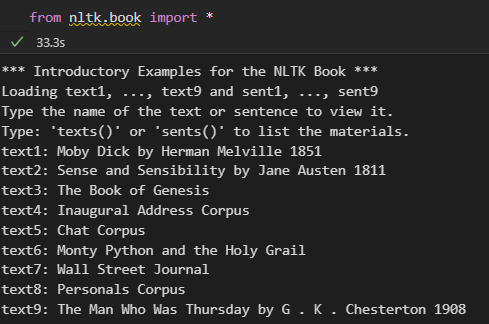
Text Processing with NLTK Package
The text classification process with NLTK involves several stages and also there are different techniques to perform these tasks. Supervised Classification is one of them, it consists of choosing the correct class label for a given input, and it can be illustrated in the diagram below:
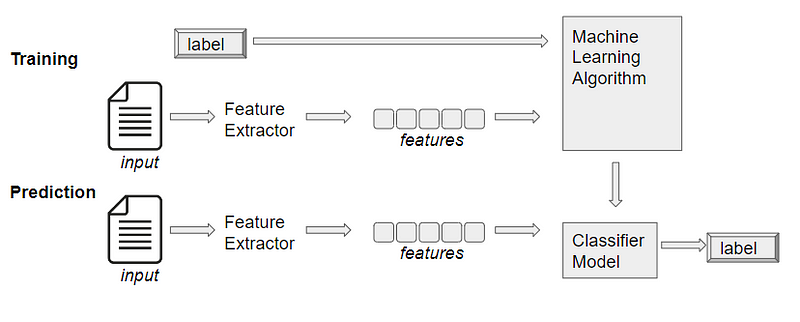
In order to explain a little bit the process of text classification, consists basically of training some feature extractors, that will be used to convert each input value into a feature set, these feature sets capture the basic information about each input that should be used to classify them.
Next we will use one of these classifiers that can be employed to solve a wide variety of text classification tasks.
Gender identification is one of the most common applications of text classification. The NLTK package provides various tools and methods for gender identification. In the next section of the tutorial, we will explore some of these methods.
Gender Identification using Name Corpus
The NLTK package provides a name corpus that contains up to 8,000 names categorized by gender. We can use this corpus to train a gender classifier by importing nltk.book or nltk.corpus.
The nltk.corpus library contains a collection of corpora (plural form of corpus), which are large and structured sets of text that are commonly used for natural language processing tasks. These corpora can be used for tasks such as text classification, sentiment analysis, language modeling, and more. According to “Natural Language Processing with Python” Some of the most commonly used corpora available in NLTK include:
brown: This corpus contains text from 500 sources, categorized into 15 genres, including news, editorial, fiction, and more.
gutenberg: This corpus contains a large collection of literary texts, including novels, plays, and poetry, that are available in the public domain.
movie_reviews: This corpus contains 2,000 movie reviews, categorized into positive and negative reviews.
treebank: This corpus contains a parsed version of the Wall Street Journal, which is a widely used dataset for training and evaluating part-of-speech taggers and parsers.
For this tutorial, we will be using the names corpus in the nltk.corpus library, which contains two text files (female.txt and male.txt) with a list of names classified by gender. This corpus is useful for gender identification tasks, such as training a classifier to predict the gender of a given name.
These datasets are commonly used for gender identification tasks, as the distribution of names can provide insight into the gender of the author or subject of a text.
First let’s explore our datasets by defining a custom function that will give us some basic idea of the data we are dealing with:
def gender_stats(filename:str): dataset_lenght = len(names.words(filename)) first_10_names = names.words(filename)[:10] last_letters = [name[-1] for name in names.words(filename)] last_letter_freq = nltk.FreqDist(last_letters)
print(f'Dataset lenght is: {dataset_lenght} \nThe first names of the dataset are: {first_10_names} \nLast letters of the names of this dataset are: {last_letter_freq.most_common(5)}')
When passing the female.txt dataset as a parameter of that function we get the following output:

By using this text classifier we will demonstrate that male and female names have some distinctive characteristics. Names ending in a, e, and i are likely to be female names, and names ending in k, o, r, s, and t are likely to be male names. Note that the following code is the standard way to work with the NLTK package in this field:
from nltk.corpus import names import random
def gender_features(word): return {'last_letter': word[-1]}
names = ([(name, 'male') for name in names.words('male.txt')] + [(name, 'female') for name in names.words('female.txt')]) random.shuffle(names)
featuresets = [(gender_features(n), g) for (n,g) in names] train_set, test_set = featuresets[500:], featuresets[:500]
classifier = nltk.NaiveBayesClassifier.train(train_set)
print(nltk.classify.accuracy(classifier, test_set)) print(classifier.show_most_informative_features(10))
In the above example, we defined a feature extractor function that returns the last letter of a given name. We used this function to extract the features from the names corpus and trained a Naive Bayes classifier.
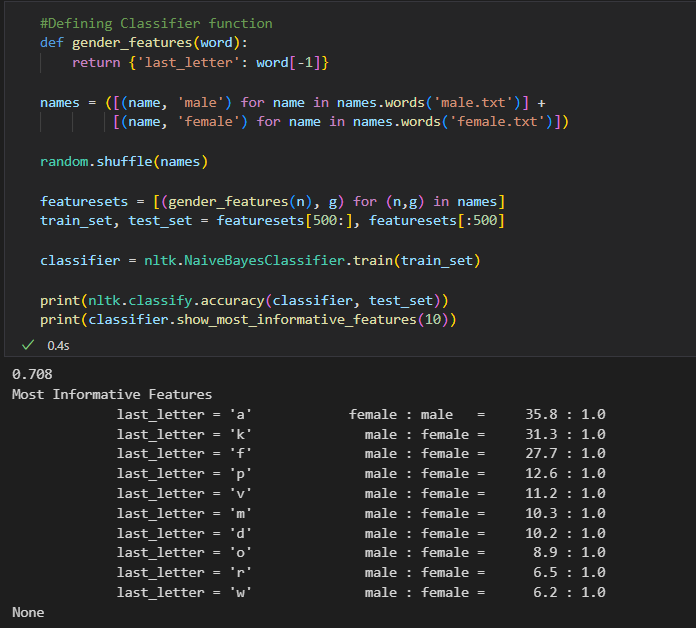
The feature extractor processes the names data, and divides the resulting list of feature sets into training and test sets, where the training set is used to train a Naive Bayes classifier.
We then evaluated the performance of the classifier on a test set and displayed the 10 most informative features, the result shows that the names in the training set that end in a are female 35.8 times more often than they are male, but names that end in k are male 31.3 times more often
than they are female.
Gender Identification using Text Classification
We can also use text classification methods to identify the gender of a given text. In this example, we previously used a Naive Bayes classifier to identify the gender of a given name.
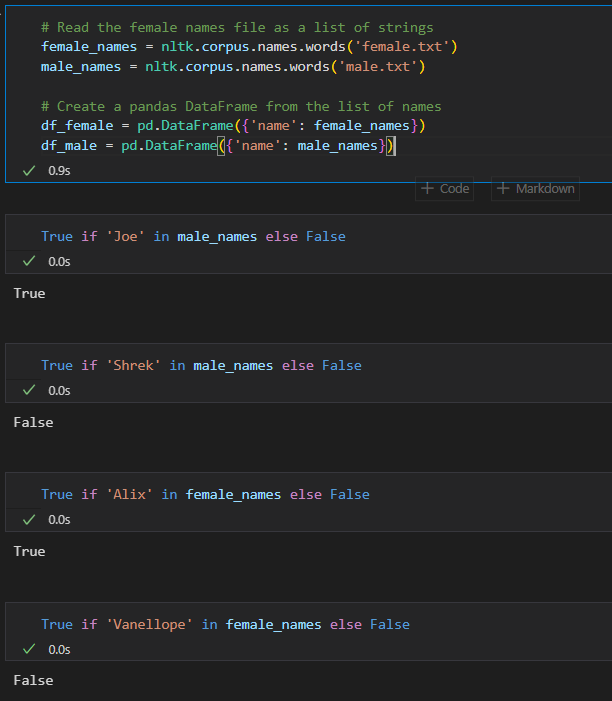
Now let’s just test out our Classifier on some names that do not appear in the training data, we just read both datasets from nltk.corpus.names as pandas DataFrames, and then check if the names that we want to pass to the classifier function exist or not inside the male and female datasets:
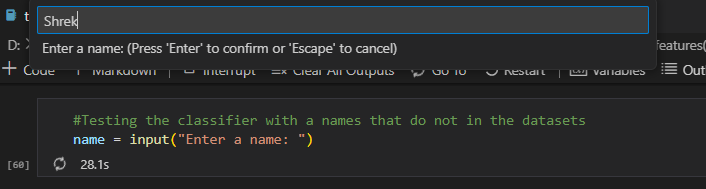
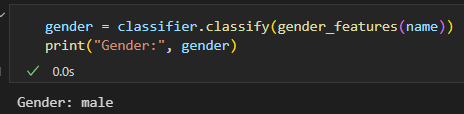
After inputting the name in the box, chances are that the classifier will tell you that is a male name:
Final words
In conclusion, natural language processing (NLP) is a powerful tool for text classification tasks. With the help of the Python NLTK package, it is easy to preprocess and analyze text data, extract features, and classify texts, making it an essential part of every modern data stack.
However, it is important to note that NLP is not a one-size-fits-all solution, and the success of text classification models depends on many other factors such as the quality of the data, the choice of features, and the selection of algorithms. It is also important to be aware of ethical considerations and potential biases in NLP models, especially when dealing with sensitive topics or underrepresented groups.
In this tutorial, we have covered the basics of NLP for text classification, we have also learned how to use the Python NLTK package to implement these techniques following along with code examples. I hope that this tutorial has provided a useful introduction to NLP for text classification and encouraged you to explore further and apply these techniques to your own text data.
As always, I invite you to clone the code from the repo and make suggestions, improvements…


